 This wiki is no longer being updated as of December 10, 2025.
|
Contact Zone:Contact Verify:Processing Options: Difference between revisions
Jump to navigation
Jump to search
No edit summary |
No edit summary |
||
| (One intermediate revision by the same user not shown) | |||
| Line 1: | Line 1: | ||
{{ContactZoneContactVerifyNav | |||
|ContactVerifyCollapse= | |||
{ | }} | ||
{ | |||
| | |||
{{CustomTOC}} | {{CustomTOC}} | ||
| Line 59: | Line 7: | ||
The Contact Verify Component has three possible Processing Options: | The Contact Verify Component has three possible Processing Options: | ||
[[File:CZ_CV_ProcessingOptions. | [[File:CZ_CV_ProcessingOptions.png|link=]] | ||
==Processing Mode== | ==Processing Mode== | ||
Latest revision as of 01:09, 3 January 2017
| Contact Verify Navigation | |||||||||
|---|---|---|---|---|---|---|---|---|---|
| Overview | |||||||||
| Tutorial | |||||||||
| |||||||||
| |||||||||
| Result Codes |
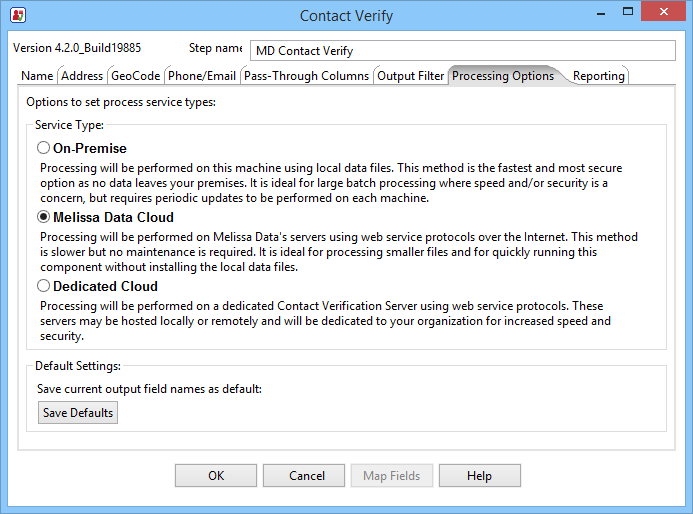
The Contact Verify Component has three possible Processing Options:
Processing Mode
You have the option of using the Contact Verification Component on-premise, using locally installed instances of the objects in Melissa Data's Data Quality Suite, or over the web, using Melissa Data's WebSmart services.
- On-Premise
- This processing is faster, but requires that you keep the objects and their underlying data files up-to-date and on-premise.
- Web (Melissa Data Cloud)
- This processing always has up-to-date data, but requires an internet connection and is slower than On-Premise processing.
- Local Appliance (Dedicated Cloud)
- This process is similar to Melissa Data Cloud processing, except that CVC connects to a Contact Verification Server using the same protocols used by Melissa Data Cloud process to connect to the WebSmart web services.