 This wiki is no longer being updated as of December 10, 2025.
|
Listware Desktop:Output
Jump to navigation
Jump to search
| Listware Desktop Navigation | ||||
|---|---|---|---|---|
| Introduction | ||||
| System Requirements | ||||
| ||||
| Input | ||||
| Configuration | ||||
| Output | ||||
| Run |
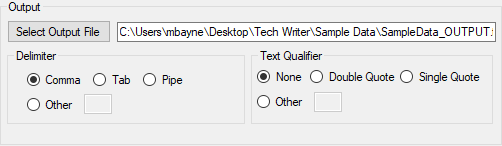
Once you've chosen your configuration settings, you have access to the Output section of the software.
Select Output File
Clicking the Select Output File button will open a dialog where you can navigate to your desired output file save location.
Delimiter
Select the delimiter you want to use in your output file.
- Comma
- Delimit with a comma [
,] character.
- Tab
- Delimit with a tab space.
- Pipe
- Delimit with a pipe [
|] character.
- Other
- Delimit with a character you specify.
Text Qualifier
Select the type of text qualifier you want to use in your output file.
- None
- Have no text qualifier.
- Double Quote
- Specify text with double quotes [
"].
- Single Quote
- Specify text with single quotes [
'].
- Other
- Specify your own text qualifier.