 This wiki is no longer being updated as of December 10, 2025.
|
SSIS:Personator:Actions: Difference between revisions
Jump to navigation
Jump to search
No edit summary |
|||
| (2 intermediate revisions by 2 users not shown) | |||
| Line 1: | Line 1: | ||
{{SSISPersonatorNav | |||
|PersonatorTabsCollapse= | |||
{ | }} | ||
{ | |||
| | |||
| Line 62: | Line 18: | ||
;Move | ;Move | ||
:Updates the address when a move is found. | :Updates the address when a move is found. | ||
;Append | ;Append | ||
Latest revision as of 17:32, 25 September 2017
← SSIS:Data Quality Components
| Personator Navigation | |||||||
|---|---|---|---|---|---|---|---|
| Overview | |||||||
| Tutorial | |||||||
| |||||||
| |||||||
|
The Actions tab allows you to specify which actions you would like to perform.
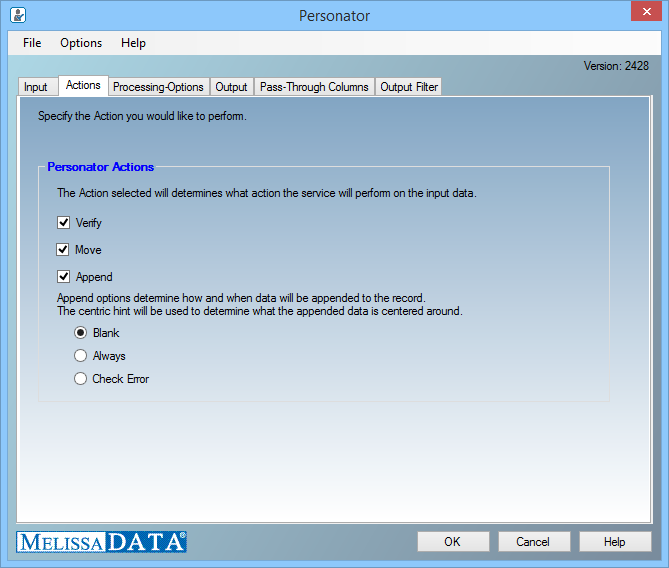
Personator Actions
Choose which action you wish to perform with the Personator component.
- Verify
- (Default) Will return the relationships between your different input data pieces. It can show you if your name, address, email, and phone number are correlated.
- Move
- Updates the address when a move is found.
- Append
- Allows you to enrich your contact records with data returned by the Personator component.
Append Options
- Blank
- Append data when incoming information is blank.
- Always
- Always append data with the information provided by Melissa Data.
- Check Error
- Append data when incoming information cannot be verified.