 This wiki is no longer being updated as of December 10, 2025.
|
Listware for Excel:Global:Processing: Difference between revisions
Jump to navigation
Jump to search
No edit summary |
No edit summary |
||
| Line 63: | Line 63: | ||
==Credits Used== | ==Credits Used== | ||
[[File: | [[File:LWE_Global_CreditsUsed.png|link=]] | ||
Once processing is complete a window will pop-up, displaying the amount of credits your data cleansing process used. | Once processing is complete a window will pop-up, displaying the amount of credits your data cleansing process used. | ||
Revision as of 23:12, 31 May 2018
← Listware for Excel Reference
| Global Check and Verify Navigation | |||||||||
|---|---|---|---|---|---|---|---|---|---|
| ← Check and Verify | |||||||||
| Overview | |||||||||
| Tutorial | |||||||||
| |||||||||
|
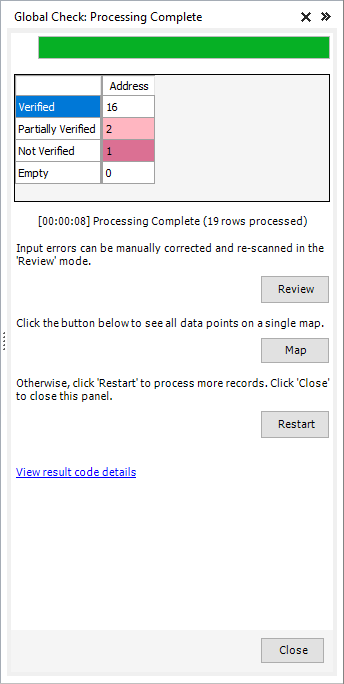
Processing will display the progress of your data cleansing.
- Review
- If you want to review or modify the results of the data cleansing, click 'Review'.
- Restart
- If you want to restart the data cleansing process (possibly to change some settings, process more records, etc.) click 'Restart'.
- Close
- Click 'Close' to close the Listware Add-in. Make sure to save your file before you exit Excel, or you may lose your cleansed data.
Credits Used
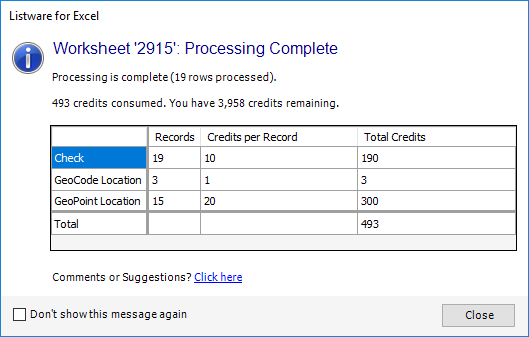
Once processing is complete a window will pop-up, displaying the amount of credits your data cleansing process used.